
本文将从最基础的 pytorch 操作一步步学习
1、通过python列表创建 torch数据
# 导入pytorch的库在这里也就是torch
import torch
# 通过一个列表来创建 torch
data1 = torch.tensor([[1.1, -1.1], [1. , -1.1]])
这里备注下,实则在 torch 中 tensor 许多操作都很类似 numpy 这个库
2、通过 numpy 的数组来创建 tensor
data2 = torch.tensor(np.array([[1,2,3],[4, 5, 6]]))

输出:
tensor([[1, 2, 3],
        [4, 5, 6]], dtype=torch.int32)
3、通过 torch自带的 api 来创建 tensor
torch.empty(3, 4 )  创建3行4列的空tensor,说是创建空的,实则就是0
torch.ones( [3,4] ) 创建3行4列的全为1的 tensor
torch.zeros([3,4]) 创建3行4列全为0的tensor
torch.rand([3,4]) 创建一个3行4列的tensor,其中的元素为0~1 之间的数据
torch.randn([3,4]) 创建一个3行4列的tensor,实则里面的元素方差为1,均值为0
4、获取 torch 中的数据
4.1 当只有一个元素的时候
  	# 当 torch 中只有一个元素的时候,可以用 item() 来获取这个元素
	  t1 = a = torch.tensor(np.arange(1))
    print(t1)
    # out:tensor([0], dtype=torch.int32)
    print(t1.item())
    # out:0
4.2 转化成 numpy 数组来实现读取。
    t1 = a = torch.randn([3, 4])
    print(type(t1))
    print(t1)
    print(type(t1.numpy()))
    print(t1.numpy())
out:
<class 'torch.Tensor'>
tensor([[-2.1239, -0.0909, -1.5348, -1.2876],
        [-0.9081,  0.3360,  1.6969,  0.3123],
        [ 0.3102,  0.8689, -0.3897,  0.2151]])
<class 'numpy.ndarray'>
[[-2.123888   -0.09085716 -1.534757   -1.2876265 ]
 [-0.90809774  0.3359716   1.696873    0.3122723 ]
 [ 0.31016025  0.86885756 -0.38969612  0.21510045]]
从上面输出的结果来看,torch 经过转换后就变成了 numpy 这个数组
5、torch 其他常见的属性操作
5.1、torch 获取其形状
data2 = torch.empty(3, 4)
data2.size()

# torch.Size([3, 4])
5.2、torch 获取其形状
data2 = torch.empty(3, 4)
data2 = data2.view(2,6)

# tensor([[0., 0., 0., 0., 0., 0.],
        [0., 0., 0., 0., 0., 0.]])
在 numpy 中改变形状是使用 shape,来改变,而在 torch 中是通过 view 来改变
5.3、其他操作
获取最大值:`tensor.max()`
转置:`tensor.t()`
获取某行某列的值:`tensor[1,3]`  这里就是获取tensor中第一行第三列的值
tensor[1,3]=100` 对tensor中第一行第三列的位置进行赋值100`
 torch切片: x[:,1]
6、torch 常见的数据类型
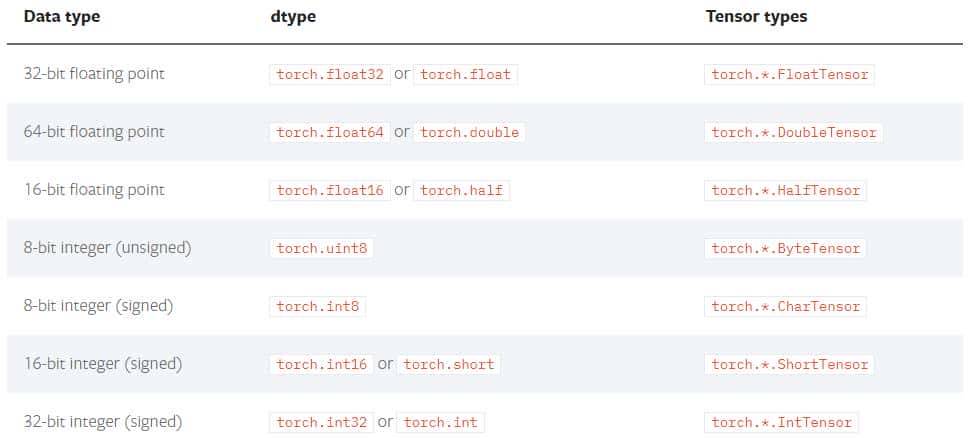
torch的数据类型
数据类型的获取   x.dtype  # torch.int32
数据类型的设置   torch.ones([2,3],dtype=torch.float32)
数据类型的修改  a.type(torch.float)  # 列如a 在之前已经设置过了,如果这样再设置一遍就是修改了
7、torch 的基本运算操作
x = x.new_ones(5, 3, dtype=torch.float)
 y = torch.rand(5, 3)
# 相加操作
 x+y
 torch.add(x,y)
x.add(y)
x.add_(y)
注意的是最后这一种操作会改变X的值
x +10 # 也就是对每个元素进行+10© 版权声明
文章版权归作者所有,未经允许请勿转载。
相关文章




您必须登录才能参与评论!
立即登录

是pytorch,你的题目拼错了
尴尬,我改过来
多谢大佬,我脸丢大了
没事的,改过来就是好同志
收藏了,感谢分享
感谢,后面会持续更新